거울 부분만 발췌
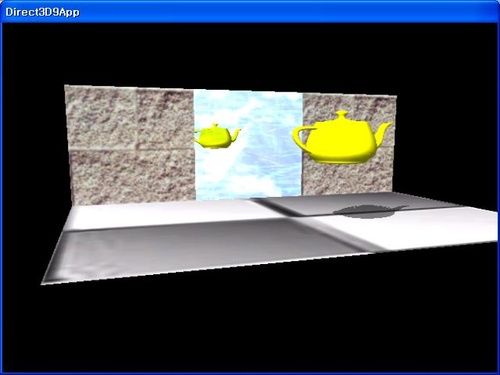
void RenderMirror()
{
//
// Draw Mirror quad to stencil buffer ONLY. In this way
// only the stencil bits that correspond to the mirror will
// be on. Therefore, the reflected teapot can only be rendered
// where the stencil bits are turned on, and thus on the mirror
// only.
//
// 이곳은 초기 선언입니다.(1) 거울인 경우 전부 반사해야 하기 때문에 전부 반사하게 만들어 둡니다.
Device->SetRenderState(D3DRS_STENCILENABLE, true);//스텐실이 가능하게 한다.
Device->SetRenderState(D3DRS_STENCILFUNC, D3DCMP_ALWAYS); //스텐실 기능은 항상 성공
Device->SetRenderState(D3DRS_STENCILREF, 0x1); // 참조값은 1, 전부 반사합니다.
Device->SetRenderState(D3DRS_STENCILMASK, 0xffffffff);// 마스크는 무시. 전부 1 이면 그냥 값이 나오므로 무시와 똑같습니다.
Device->SetRenderState(D3DRS_STENCILWRITEMASK, 0xffffffff);// 쓰는 마스크도 무시
Device->SetRenderState(D3DRS_STENCILZFAIL, D3DSTENCILOP_KEEP);// 깊이 테스트가 실패하면 스텐실 버퍼 항목을 변경하지 않는다.
Device->SetRenderState(D3DRS_STENCILFAIL, D3DSTENCILOP_KEEP);// 스텐실을 실패하면 스텐실 버퍼 항목을 변경하지 않는다.
Device->SetRenderState(D3DRS_STENCILPASS, D3DSTENCILOP_REPLACE);//스텐실을 패스하면 스텐실 버퍼 항목을 참조값으로 대치한다
// disable writes to the depth and back buffers
// 여기는 뻔한 설정
Device->SetRenderState(D3DRS_ZWRITEENABLE, false);
Device->SetRenderState(D3DRS_ALPHABLENDENABLE, true);
Device->SetRenderState(D3DRS_SRCBLEND, D3DBLEND_ZERO);
Device->SetRenderState(D3DRS_DESTBLEND, D3DBLEND_ONE);
// draw the mirror to the stencil buffer
// 거울 오브젝트를 스텐실 버퍼 영역에 그려줍니다만, 이제 위 선언(1)과의 계산을 통해
// 그려지는 족족 1로 계산되어서, 결국 거울 영역만큼의 스텐실 버퍼 픽셀 부분이 1값으로 그려지게 됩니다.
Device->SetStreamSource(0, VB, 0, sizeof(Vertex));//스트림 소스
Device->SetFVF(Vertex::FVF); // 버텍스 FVF
Device->SetMaterial(&MirrorMtrl);//메터리얼
Device->SetTexture(0, MirrorTex);//텍스쳐
D3DXMATRIX I;
D3DXMatrixIdentity(&I);
Device->SetTransform(D3DTS_WORLD, &I);//정규화한후 월드 좌표계로 전환.
Device->DrawPrimitive(D3DPT_TRIANGLELIST, 18, 2); // 트라이엥글 리스트로 2 폴리곤(거울) 을 그린다.
// re-enable depth writes
Device->SetRenderState( D3DRS_ZWRITEENABLE, true ); // z버퍼를 쓸 수 있게 한다.
// only draw reflected teapot to the pixels where the mirror
// was drawn to.
// 또 선언이 바뀝니다.(2) 이번엔 주전자가 그려지도록 하는 설정입니다.
// 여기서 스텐실과 연산해서 양쪽이 동일해야 패스해 줍니다. 패스가 되면 값이 유지됩니다.
Device->SetRenderState(D3DRS_STENCILFUNC, D3DCMP_EQUAL);//비교 연산자는 왼쪽과 오른쪽이 동일하면 성공
Device->SetRenderState(D3DRS_STENCILPASS, D3DSTENCILOP_KEEP);//스텐실이 패스하면 유지하라
// position reflection
// 반사 공식입니다.
D3DXMATRIX W, T, R;
D3DXPLANE plane(0.0f, 0.0f, 1.0f, 0.0f); // xy plane
D3DXMatrixReflect(&R, &plane);
D3DXMatrixTranslation(&T,
TeapotPosition.x,
TeapotPosition.y,
TeapotPosition.z);
W = T * R;
// clear depth buffer and blend the reflected teapot with the mirror
// 깊이 버퍼를 없애야 주전자가 거울 앞에 그려집니다.
Device->Clear(0, 0, D3DCLEAR_ZBUFFER, 0, 1.0f, 0);
Device->SetRenderState(D3DRS_SRCBLEND, D3DBLEND_DESTCOLOR);
Device->SetRenderState(D3DRS_DESTBLEND, D3DBLEND_ZERO);
// Finally, draw the reflected teapot
// 주전자를 그려주지만, 위 선언(2) 에 따라서 스텐실 값이 있는 곳에만 주전자가 그려지게 됩니다.
Device->SetTransform(D3DTS_WORLD, &W);
Device->SetMaterial(&TeapotMtrl);
Device->SetTexture(0, 0);
// reverse cull mode
// 컬링모드를 뒤집어 줘야 뒤집힌 주전자가 생기니까요
Device->SetRenderState(D3DRS_CULLMODE, D3DCULL_CW);
Teapot->DrawSubset(0);
// Restore render states.
// 바꾼 설정을 다시 원위치 시킵니다.
Device->SetRenderState(D3DRS_ALPHABLENDENABLE, false);
Device->SetRenderState( D3DRS_STENCILENABLE, false);
Device->SetRenderState(D3DRS_CULLMODE, D3DCULL_CCW);
}