이전의 이미지에 블러를 추가한 다음에
그걸 덧셈 연산으로 원 이미지와 혼합해서
블룸 효과 - 뽀샤시 효과-를 만들다.
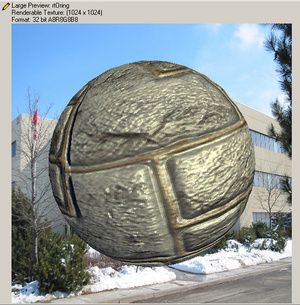 원본이미지에다가
POW와 블러 이미지를 연산해서 다음 그림을 만들었슴다.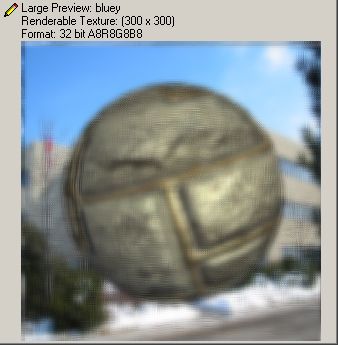 다시 이걸 원본 이미지와 단순한 덧셈연산으로 계산.
일명 ‘뽀샤시 효과’ 라고 부르는 블룸 효과를 완성했습니다.
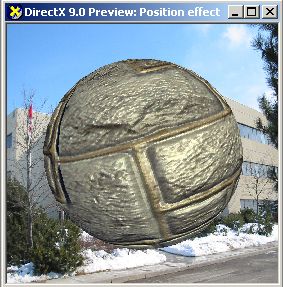
좌측은 원본. 우측이 뽀샤시 효과가 적용된 최종버전이죠.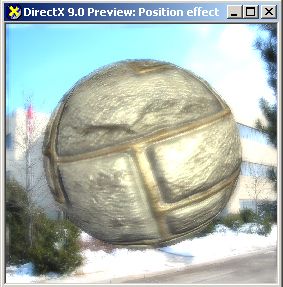
//이전과 이어짐
//DrawblueX Vertex
struct VS_INPUT
{
float4 Position : POSITION0;
};
struct VS_OUTPUT
{
float4 Position : POSITION0;
float2 texcoord : TEXCOORD0;
};
VS_OUTPUT vs_main( VS_INPUT Input )
{
VS_OUTPUT Output;
Input.Position.xy = sign(Input.Position.xy);
Output.Position = float4 (Input.Position.xy , 0.0f, 1.0f);
Output.texcoord = (float2(Output.Position.x, -Output.Position.y) +1.0f)/2.0f;
return( Output );
}
//DrawblueX Pixel
sampler2D Texture0;
float4 gaussFilter [7] =
{
0.0, -3.0,0.0, 1.0/64.0,
0.0, -2.0,0.0, 6.0/64.0,
0.0, -1.0,0.0, 15.0/64.0,
0.0, 0.0,0.0, 20.0/64.0,
0.0, 1.0,0.0, 15.0/64.0,
0.0, 2.0,0.0, 6.0/64.0,
0.0, 3.0,0.0, 1.0/64.0
};
float texscaler = 1.0/128.0;
float texOffset = 0.0;
float4 ps_main(float2 texcoord : TEXCOORD0) : COLOR0
{
float4 color = 0.0;
int i;
for (i=0;i<7;i++)
{
color += tex2D(Texture0,float2(texcoord.x + gaussFilter[i].x * texscaler ,
texcoord.y + gaussFilter[i].y * texscaler))
* gaussFilter [i].w;
}
return color;
}
//DrawblueY Vertex
struct VS_INPUT
{
float4 Position : POSITION0;
};
struct VS_OUTPUT
{
float4 Position : POSITION0;
float2 texcoord : TEXCOORD0;
};
VS_OUTPUT vs_main( VS_INPUT Input )
{
VS_OUTPUT Output;
Input.Position.xy = sign(Input.Position.xy);
Output.Position = float4 (Input.Position.xy , 0.0f, 1.0f);
Output.texcoord = (float2(Output.Position.x, -Output.Position.y) +1.0f)/2.0f;
return( Output );
}
//DrawblueY Pixel
sampler2D Texture0;
float4 gaussFilter [7] =
{
-3.0,0.0,0.0, 1.0/64.0,
-2.0,0.0,0.0, 6.0/64.0,
-1.0,0.0,0.0, 15.0/64.0,
0.0,0.0,0.0, 20.0/64.0,
1.0,0.0,0.0, 15.0/64.0,
2.0,0.0,0.0, 6.0/64.0,
3.0,0.0,0.0, 1.0/64.0
};
float texscaler = 1.0/128.0;
float texOffset = 0.0;
float4 ps_main(float2 texcoord : TEXCOORD0) : COLOR0
{
float4 color = 0.0;
int i;
for (i=0;i<7;i++)
{
color += tex2D(Texture0,float2(texcoord.x + gaussFilter[i].x * texscaler ,
texcoord.y + gaussFilter[i].y * texscaler))
* gaussFilter [i].w;
}
return color;
}
//DrawBlend Vertex
struct VS_INPUT
{
float4 Position : POSITION0;
};
struct VS_OUTPUT
{
float4 Position : POSITION0;
float2 texcoord : TEXCOORD0;
};
VS_OUTPUT vs_main( VS_INPUT Input )
{
VS_OUTPUT Output;
Input.Position.xy = sign(Input.Position.xy);
Output.Position = float4(Input.Position.xy , 0.0f,1.0f);
Output.texcoord = (float2(Output.Position.x , -Output.Position.y)+1.0f)/2.0f;
return( Output );
}
//DrawBlend Pixel
sampler2D Texture0;
sampler2D Texture1;
float4 ps_main(float2 texcoord : TEXCOORD0) : COLOR0
{
float4 c0 = tex2D(Texture0,texcoord );
float4 c1 = tex2D(Texture1,texcoord );
return c0*0.9 +c1*0.5;
}