이제 흑백의 그라디에이션 이미지의 값을 받아 투명도를 결정하게 하는 코드도 성공.
버텍스 쉐이더 단계에서
PreOpacity = max(0,dot(ViewDirection,oNormal));
을 받아 뷰 디렉션과 버텍스 노말간의 내적을 구해놓고,
픽셀 쉐이더로 넘겨서
float1 Opacity = tex2D(GradientSampler,PreOpacity).r;
를 이용하여 흑백의 긴 이미지에서 값을 얻어 내는게 핵심이다.
tex1D를 써도 충분했는데, 그렇게 하면 맥스에서 매뉴가 안나오니 걍 ….
흑백이미지에서 뽑아내야 하는데, 에이 뭐 그냥 Red채널에서 뽑아내도 되지 걍….
단점이라면 구라서 원하는 텍스쳐를 좋은자리에 집어넣기 힘들고,
구를 제외한 긴 형태에서는 원하지 않는 이미지가 나온다는 것.
텍스쳐를 집어 넣으려면 빌보드를 쓰는 것이 나을테고,
이것은 보호막 같은 이펙트로 사용하는 것이 좋을듯 하다.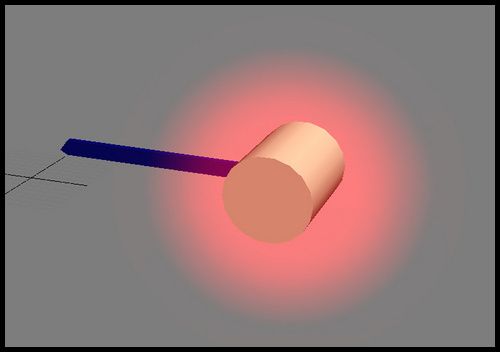
// 밖으로 갈수록 투명해지는 이펙트 쉐이더
//외각 부분을 텍스쳐를 이용해서 그 정도를 조절한다.
float4x4 WorldViewProj : WORLDVIEWPROJ ;
float4x4 World : WORLD ;
float4x4 ViewI : VIEWI ;
texture2D basetexture : DIFFUSE
<
string UIName = “Basetexture”;
int Texcoord = 0;
int MapChannel = 1;
;
sampler2D BaseSampler = sampler_state
{
texture = ;
MinFilter = Linear;
MagFilter = Linear;
MipFilter = Linear;
};
texture2D Gradienttexture : GRADIENT
<
string UIName = “Gradienttexture”;
int Texcoord = 0;
int MapChannel = 1;
;
sampler2D GradientSampler = sampler_state
{
AddressU = Clamp;
AddressV = Clamp;
texture = ;
MinFilter = Linear;
MagFilter = Linear;
MipFilter = Linear;
};
void VS
(
in float4 iPos : POSITION,
in float4 iNormal : NORMAL,
in float2 itex : TEXCOORD0,
out float4 oPos : POSITION,
out float2 otex : TEXCOORD0,
out float3 PreOpacity : TEXCOORD1
)
{
float4 WorldPos = mul(iPos , World) ;
float3 oNormal = normalize(mul(iNormal,(float3x3)World));
float3 ViewDirection = normalize ( ViewI[3].xyz - WorldPos.xyz );
PreOpacity = max(0,dot(ViewDirection,oNormal));
oPos = mul(iPos, WorldViewProj);
otex = itex;
}
void PS
(
in float3 itex : TEXCOORD0,
in float3 PreOpacity : TEXCOORD1,
out float4 oColor : COLOR
)
{
float3 otex = tex2D(BaseSampler, itex);
float1 Opacity = tex2D(GradientSampler,PreOpacity).r;
oColor = float4(otex.rgb ,Opacity);
}
technique jp13
{
pass p0
{
AlphaBlendEnable = true;
SrcBlend = SRCALPHA;
DestBlend = ONE;
Vertexshader = compile vs_2_0 VS();
Pixelshader = compile ps_2_0 PS();
}
/*
pass p1
{
AlphaBlendEnable = true;
Vertexshader = compile vs_2_0 VS1();
Pixelshader = compile ps_2_0 PS1();
}*/
}