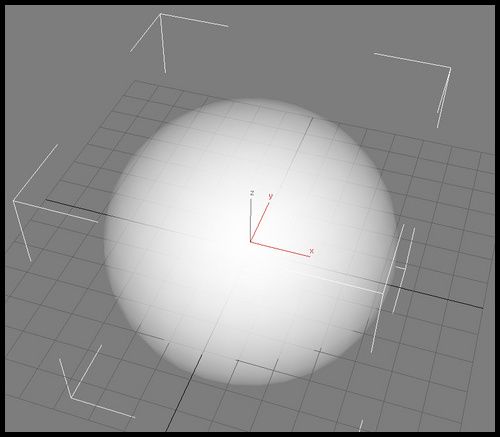
중심부에서 멀어져갈수록 투명해지는 쉐이더 완성.
요것은 창작이다. 유치한 수준이지만 ㅋㅋ
뷰 디렉션과 노말값을 내적해서 그 값을 알파 채널에 강제로 박아 넣었다.
그것이 핵심. 무척 무식하다 ㅡ,.ㅡ
float4 Opacity = dot(ViewDirection,oNormal);
oLight = float4 (D_C * max(0,dot(LightDirection, oNormal)),Opacity.a);
그렇게 하니까 노말값과의 내적 수치가 커지면 커질수록 알파값도 적어진다.
이걸 ps 단계에서 합쳐서 계산하기.
float3 oLight = Spec + A_C;
oColor = float4(oLight.rgb + iLight.rgb,iLight.a);
일단은 구현에 중점을 둔, 굉장히 쓰레기 스러운 코드.
이제 이걸 기반으로 텍스쳐가 입혀질수 있도록 하고,
이펙트니까 빛의 영향을 받지 않도록 하자.
아차. 알파채널도 합쳐서 float4로 내보낼게 아니라, float1으로 따로 내보내서 ps 단계에서 합쳐버리자.
float4x4 WorldViewProj : WORLDVIEWPROJ ;
float4x4 World : WORLD ;
float4x4 ViewI : VIEWI ;
float3 LightDirection : DIRECTION
<
string UIName = “lightdirection”;
string Object = “Directionallight”;
;
float3 A_C : AMBIENT
<
string UIName = “AmbientColor”;
;
float3 D_C : DIFFUSE
<
string UIName = “DiffuseColor”;
= {0.5f,0.5f,0.5f};
float3 S_C : SPECULAR
<
string UIName = “SpecularColor”;
= {1.0f,1.0f,1.0f};
void VS
(
in float4 iPos : POSITION,
in float4 iNormal : NORMAL,
out float4 oPos : POSITION,
out float4 oLight : TEXCOORD0,
out float4 Spec : COLOR
)
{
float4 WorldPos = mul(iPos , World) ;
float3 oNormal = normalize(mul(iNormal,(float3x3)World));
float3 ViewDirection = normalize ( ViewI[3].xyz - WorldPos.xyz );
float3 Halfvector = normalize (ViewDirection + LightDirection);
float4 Opacity = dot(ViewDirection,oNormal);
oLight = float4 (D_C * max(0,dot(LightDirection, oNormal)),Opacity.a);
oPos = mul(iPos, WorldViewProj);
Spec = pow(max(0, dot(oNormal,Halfvector)),50);
}
void PS
(
in float3 Spec : COLOR,
in float4 iLight : TEXCOORD0,
out float4 oColor : COLOR
)
{
float3 oLight = Spec + A_C;
oColor = float4(oLight.rgb + iLight.rgb,iLight.a);
}
technique jp13
{
pass p0
{
Vertexshader = compile vs_2_0 VS();
Pixelshader = compile ps_2_0 PS();
}
}